The Best Monitor
The sharpest, most color-accurate IPS productivity monitor you can buy — and it charges your laptop over one cable. · Updated June 25, 2026
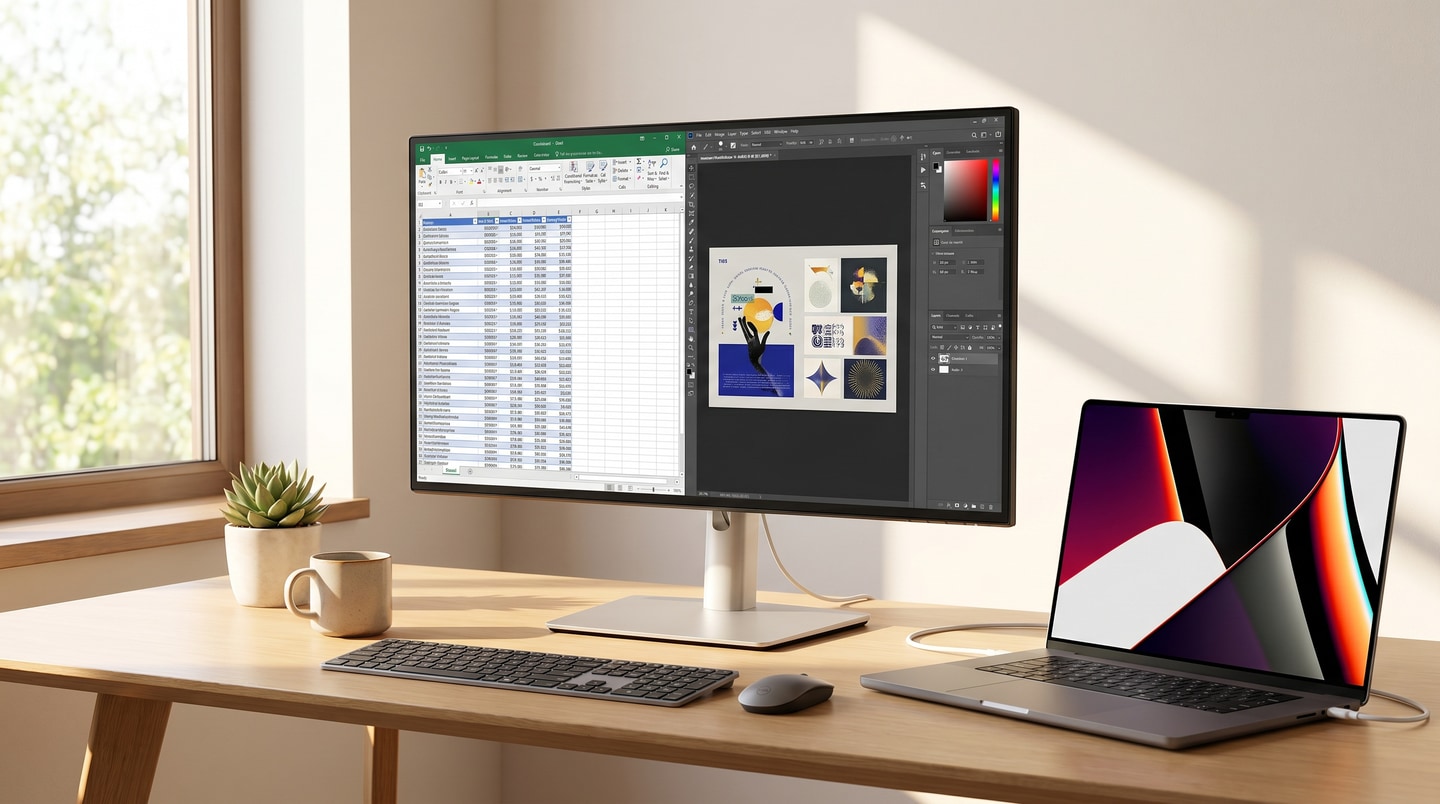
Dell UltraSharp U2725QE
Also at dell.com
star.shop researches products across the internet, Reddit, Wirecutter, and other review sites, filters out SEO spam and fake reviews, and recommends the single best option, so you can buy with confidence, no digging required. Read about our methodology and affiliate firewall →
Pros
- IPS Black panel delivers deeper blacks and stronger contrast than standard IPS, with excellent factory color accuracy
- Crisp 4K resolution at 27 inches with smooth 120Hz refresh for everyday productivity
- Thunderbolt 4 / USB-C hub charges a MacBook Pro and drives peripherals over a single cable
- Built-in port hub reduces desk clutter and replaces a separate dock
Cons
- At $655 it's a premium price for a 27-inch productivity monitor
- Not the best gaming choice — users report coil whine and motion blur compared to OLED
- For 'best all-rounder,' many on Reddit prefer an OLED like the ASUS PG27UCDM
- Reliable but not BuyItForLife-tier — r/BuyItForLife points to Eizo FlexScan for true long-term longevity and warranty
The other picks
- RedditASUS ROG Swift PG27UCDM (QD-OLED) — for buyers wanting OLED clarity and vibrancy as a gaming all-rounderWhy the Dell UltraSharp U2725QE still wins: the Dell avoids OLED burn-in risk and delivers sharper text for all-day productivity
- RedditGigabyte AORUS FO32U2P (32" QD-OLED) — for those who prefer a larger 32-inch OLED with punchier contrast and motionWhy the Dell UltraSharp U2725QE still wins: the Dell's IPS Black panel keeps clearer text and needs no pixel-care babysitting
- RedditGigabyte M27UA (27", 4K, 160Hz, IPS) — for a more budget-conscious 4K IPS pickWhy the Dell UltraSharp U2725QE still wins: the Dell adds Thunderbolt 4 single-cable charging and stronger factory color accuracy
- r/BuyItForLifeDell UltraSharp (older IPS models) — for buyers prioritizing proven long-term reliability from mass deploymentsWhy the Dell UltraSharp U2725QE still wins: the U2725QE keeps that Dell longevity while adding 4K, 120Hz, and USB-C hub features
The sources we read for this pick (4)
- WirecutterWirecutter: The Best Monitor
- r/BuyItForLifeany such thing as a (near) bifl computer monitor? · 14 comments read
- RedditWhat monitor would you buy in 2025 · 14 comments read
- RedditMonitorsUnboxed – Best Monitors For Your Budget 2024: $100 to $1000+ Picks · 14 comments read
Methodology and Details
What star.shop is for
star.shop finds the single best product in a category and hands you that one answer, so you can buy with confidence without doing the research yourself. For the best monitor, that answer is the Dell UltraSharp U2725QE. Reaching that decision on your own usually means one of two things: reading a long, thorough Wirecutter or other editorial review — they test extensively and write up every contender, which is excellent but a lot to read and weigh — or piecing together scattered Reddit threads, old forum posts, and reviews yourself. We do all of that reading and reconcile it into the pick above; what follows is how we got there.
A firewall between research and revenue
There is a firewall between our research and our money, and we mean that literally. During the research stage we are blind — deliberately, structurally blind — to whether a product carries an affiliate tag at all, let alone what it might pay. The analysis above happens before any of that is known: the team and tools making the pick have no visibility into commission rates. Affiliate links, where they exist, are added only after the recommendation is locked, and they have no bearing whatsoever on which product wins. Editorial and monetization sit on opposite sides of that wall, the same church-and-state separation a newsroom keeps between its journalists and its ad sales.
In this case, an Amazon affiliate tag is included in the Dell UltraSharp U2725QE buy link — we take part in the Amazon Associates program, the same way sites like Wirecutter do — so if you buy through it, star.shop may earn a commission at no extra cost to you. That tag was attached only at the very end, after the Dell UltraSharp U2725QE (also Wirecutter's pick) and every alternative we considered had been evaluated the same way on the evidence. We're glad to name the best product in a category whether or not there's any money in it for us.
Why this category is hard to research well
A monitor spec sheet tells you almost nothing about what living with the display is actually like. Resolution, refresh rate, and panel type are easy to list; text sharpness, factory color accuracy, and whether the panel picks up burn-in over a year of real use only show up after the box is open and the thing has been running all day for months.
For this productivity monitor, the research points at a few specific things that decide it:
- Panel type and its tradeoffs. The U2725QE uses an IPS Black panel, which delivers deeper blacks and stronger contrast than standard IPS. The debate on Reddit isn't IPS-vs-junk; it's IPS Black vs QD-OLED, and each side wins on different things. OLED owners praise "clarity and vibrancy" that's "unmatched," but the same threads warn that OLED text readability "isn't always great on larger displays" and that these panels need pixel-care routines — hidden taskbars, pixel-shift, cleaning programs — to avoid burn-in.
- Text clarity for all-day work. A productivity monitor lives on rendered text, spreadsheets, and code, not game motion. This is where 4K at 27 inches and a non-OLED subpixel layout matter, and where first-look reviews shot in a dim room for photos don't help you.
- Single-cable connectivity. Thunderbolt 4 / USB-C charging that powers a MacBook Pro and drives peripherals over one cable is the feature that replaces a dock. It either works cleanly with your laptop or it doesn't, and that only surfaces in daily use.
- Longevity, but with a caveat. Panel failure rates are low enough that, as one commenter notes, "even an LTT-sized YouTuber could never get enough of them to get good data on durability across many models." The useful longevity evidence comes from people who deployed thousands of units, not from bench reviews.
The good evidence lives in r/Monitors, r/buildapc, and r/BuyItForLife — owners running these panels for months, and sysadmins reporting failure patterns across large fleets.
How we research a pick
We don't run our own product tests. Plenty of outlets already do rigorous, independent testing, and adding one more set of results to that pile is less useful than weighing all of them together. So star.shop is a meta-analysis: we synthesize the credible testing and the long-term owner record across every source we can find into a single pick.
- Reddit owner threads — r/Monitors' broad agreement that this is the best IPS productivity display of 2025, plus r/buildapc discussions weighing OLED against IPS for 2025 purchases.
- r/BuyItForLife fleet reports — a sysadmin who has "purchased tens of thousands of monitors" says "Dell far and away seems to have the best lifespan of any display I've purchased en masse," while flagging Samsung and HP as the worst.
- Expert roundups filtered through the comments — the MonitorsUnboxed budget guide and the reader pushback around it, including the recurring complaint that reviewers rarely test durability and that some panels "basically have problems out of the factory."
- The recurring independently-reported issues — coil whine and motion blur on the Dell versus OLED; OLED burn-in risk and mandatory pixel-care on the alternatives; weaker text on larger OLED panels.
- The core tradeoff buyers weigh — IPS Black's sharper text, no burn-in worry, and single-cable charging against OLED's superior contrast and motion. One is a better all-day work display; the other is a better gaming all-rounder.
The single most telling detail is that sysadmin account: Dell outlasting every other brand across tens of thousands of deployed units, with "only a few failed" and replaced without much issue. One fleet's experience proves nothing on its own — reliability from one buyer can be luck. What earns the pick is the same pattern showing up across unconnected owners: old Dell IPS panels "going forever," the 2025 productivity consensus, and the fleet-scale record all pointing the same direction.
The Dell UltraSharp U2725QE versus the alternatives we considered
Every alternative here is a genuinely good monitor that lost on what this specific buyer — someone who works at a desk all day — actually needs.
Dell UltraSharp U2725QE vs ASUS ROG Swift PG27UCDM (QD-OLED)
- Strongest case for it: QD-OLED clarity and vibrancy that IPS can't match, and owners call it "a fantastic monitor" as a gaming all-rounder.
- Where it loses: It carries real OLED burn-in risk — even careful owners hide the taskbar and run pixel-clean programs — and its text isn't as crisp for all-day productivity.
- Why the Dell won: For work you want sharp text and no pixel-care babysitting, which the IPS Black panel delivers. Buy the PG27UCDM if your machine is mostly for gaming and you want OLED punch.
Dell UltraSharp U2725QE vs Gigabyte AORUS FO32U2P (32" QD-OLED)
- Strongest case for it: A larger 32-inch QD-OLED with punchier contrast and motion; one owner says "the clarity and vibrancy of the OLED is unmatched."
- Where it loses: Text readability suffers on larger OLED panels, and it needs pixel-shift and image-cleaning routines to stay safe.
- Why the Dell won: The IPS Black panel keeps text clearer and needs no maintenance ritual. Get the FO32U2P if you want a big, movement-heavy display and mostly consume media and games on it.
Dell UltraSharp U2725QE vs Gigabyte M27UA (27", 4K, 160Hz, IPS)
- Strongest case for it: The most-upvoted budget pick in the MonitorsUnboxed thread — a 27-inch 4K IPS panel at a lower price.
- Where it loses: No Thunderbolt 4 single-cable charging, and weaker factory color accuracy than the Dell.
- Why the Dell won: The U2725QE adds one-cable laptop charging and a built-in hub that replaces a dock, plus stronger out-of-box color. Choose the M27UA if you want 4K IPS on a tighter budget and don't need the hub.
Dell UltraSharp U2725QE vs Dell UltraSharp (older IPS models)
- Strongest case for it: Proven long-term reliability — sysadmins report old Dell IPS panels "going forever" across mass deployments, and r/BuyItForLife singles Dell out for lifespan.
- Where it loses: Older models lack 4K, 120Hz, and USB-C hub features.
- Why the Dell won: The U2725QE keeps that Dell longevity while adding modern resolution, refresh, and single-cable charging. Older UltraSharps still make sense if you already own one and see no reason to upgrade.
What we filter out
- SEO and blog spam — thin articles assembled to rank on Google, often by writers who never used the product, restating spec sheets and each other.
- Junky affiliate roundups — "best of" lists ordered by commission rate rather than time spent using anything, where somehow every product is a winner and there's a buy button on every line.
- Astroturfing and fake Reddit comments — coordinated or paid promotion dressed up as organic enthusiasm. Recent, oddly polished praise from brand-new or low-history accounts gets heavy skepticism, especially in the past year as this has gotten cheaper to manufacture at scale.
- Fake and incentivized reviews — fabricated or comped star ratings, the kind that pile up fast on a new listing and rarely survive contact with what long-term owners actually report.
- N-of-1 blog posts — one person's single unit, briefly used, written up as a verdict. A real signal needs the same story from many unconnected owners, not one enthusiastic account.
A lot of what looks like a defect here is really a preference. Someone who wants OLED and prefers it for gaming isn't wrong — that's a different job than all-day text work, and we don't count "the Dell isn't the best gaming panel" against a monitor picked for productivity. The coil whine and motion blur reports are real and stay in; the "I'd rather have OLED vibrancy" comments are a taste, not a fault. The Eizo FlexScan comes up in r/BuyItForLife for true long-term longevity and warranty — a fair pick if longevity is your single priority, but a different tradeoff than the sharpness, color accuracy, and single-cable charging that decide this category.
Why the recommendation above stays short
Most people buying a monitor don't need this much reasoning — they need to know what to buy and what the tradeoffs are. The pick and its pros and cons up top are the compressed answer. This write-up is here for the few who want to see the evidence and understand why the Dell beat the OLEDs and the cheaper IPS panels for all-day work.
What the star.shop score means
Every pick carries a 1–5 star score for how good the product is and how happy its long-term owners are, judged against the best in its category and the ideal — never against price; an expensive product still scores high if it's excellent. The scores skew high since these are category winners, but they're not all the same: a 5.0 is rare and means essentially no real flaws, and the score steps down as common complaints or compromises add up — lowest where even the best option in a category is mediocre.
What the badges mean
- Wirecutter — a current Wirecutter pick
- r/BuyItForLife — a favorite among owners who prize long-term durability
- Reddit — a broad favorite across Reddit communities
A pick can carry several. When community consensus clearly outweighs the editorial pick, the community product takes the top spot.
Using this content
You're welcome to reference and cite anything on this page — our goal is to make the best products easy to find for everyone. If you use it, please credit star.shop and link back to this page, and don't reproduce our pages or content.